

|

In this issue
|
Okay, I'm one day late again. But at least this week I have an excuse.
On Tuesday, OpenAI released Sol and Anthropic released Opus 5.5. My ADHD kicked in, and finishing this newsletter turned into testing which AI helps me write it best. That led to a complete rework of how I put this newsletter together. I'll tell you what I tested and what changed further down.
First, a question for your business. How much could you increase your revenue each month if you could get proposals out the same day you had your project meeting?
If you quote projects or services for a living, you probably have one waiting right now. The meeting happened. You know what the customer wants. You still need to find the photos, check the price and get the proposal written. That's the work I want an assistant to take off your hands.
Marc
⚡ From the customer meeting to the customer's inbox in 1 hr. What a connected proposal process looks like on your next job. |
Picture your next customer meeting. The customer shows you the project, adds something they forgot to mention on the phone and asks when you could start. You take photos and record the conversation. By the time you leave, you have what you need to begin a proposal, spread across a recording, your phone and the customer's earlier messages.
Getting that proposal out today makes you look like a pro and gives the customer a chance to decide while the conversation is fresh. You can answer their questions and agree on the next step sooner. If a competitor takes three days to respond, your customer has already seen how you handle their project.
I've built and run the pieces of the process below separately. Here's the experience with those pieces connected, using a contractor's afternoon as the example.
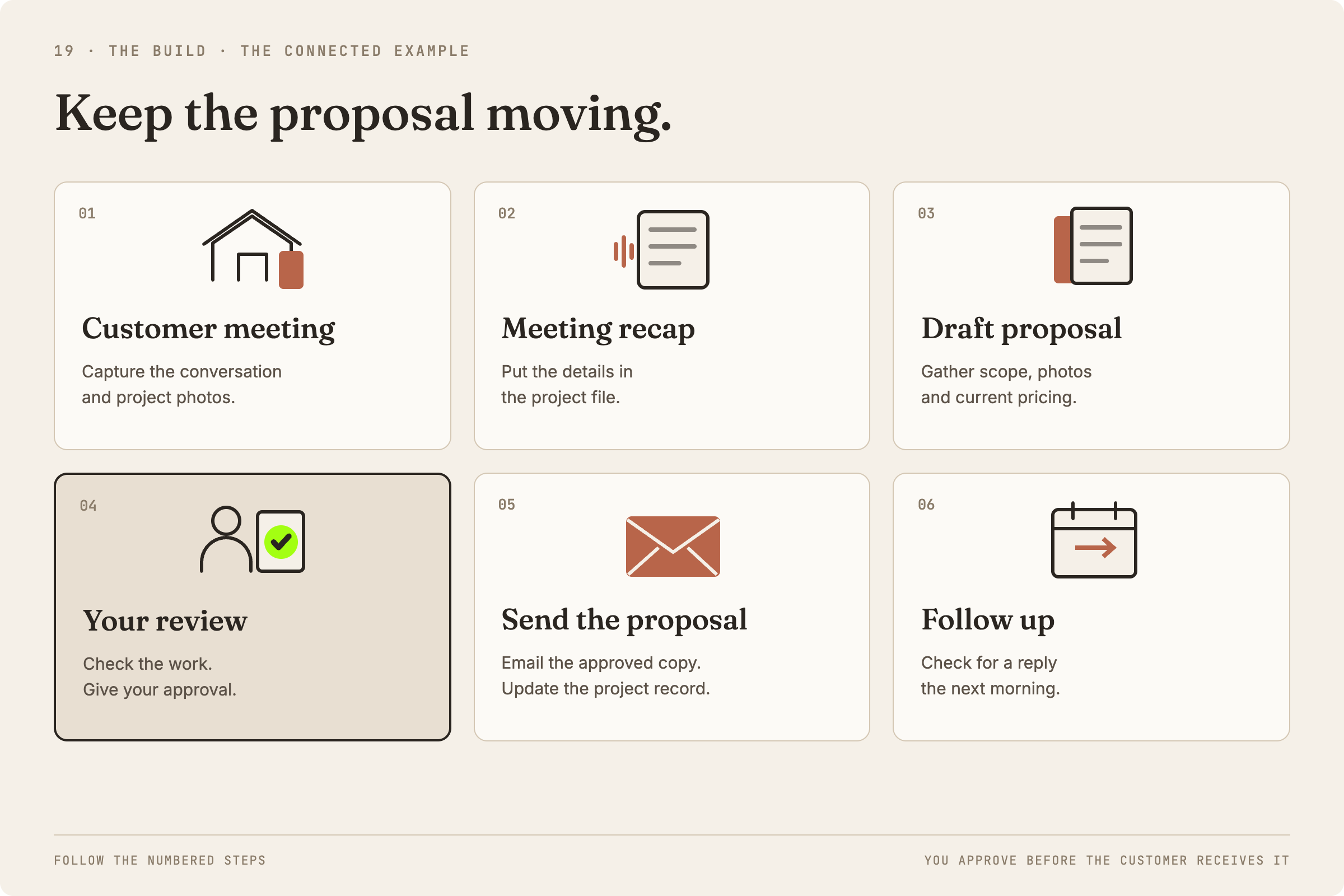
1. The walkthrough ends at 3:30. Your meeting recorder produces a written transcript of the conversation. Your photos carry the time they were taken. You leave for your next stop with the customer's request captured, including the additions that came up during the visit.
2. At 4:00, your AI meeting assistant finds the meeting. It adds the recap and transcript to the project file, then tells the sales assistant the walkthrough is ready. The project file gives both assistants the same customer and job to work from.
3. The sales assistant gathers the proposal material. It finds photos taken during the walkthrough, checks that they belong to this project and reads the customer's original texts, calls or emails. It also reads your current pricing sheet. A photo shows the condition you saw; the conversation explains what the customer asked you to do about it.
4. The assistant prepares the proposal and a review list. The draft includes relevant images, proposed work and prices from your sheet. Missing or unclear details go on the review list. If the customer asked about a start date you never agreed to, that stays a question for you to resolve.
5. You get a Slack message on the way home. The proposal is ready for review. When you're parked or back at your desk, you open the draft beside its review list. You check the scope, quantities, pricing, photos and dates, answer the open questions and make your edits. Then you give the sales assistant the thumbs up.
6. The assistant sends the approved proposal. The customer gets an email with the proposal attached. The assistant updates your internal records so the next person who opens the project can see what was sent and when. The review notes stay internal; the customer receives the final document you approved.
7. The next morning, the assistant checks for a response. It looks for recorded open activity and a customer reply. With no reply, it sends the agreed check-in within 24 hours. A customer question goes to you instead of triggering a reminder. An open notification alone doesn't tell you what the customer thought.
The customer receives a clear proposal and a timely follow-up. You spend your review time checking the job you actually discussed, with the photos and prices already gathered. That leaves you more time for the next customer meeting and gives each proposal a better chance of reaching a decision.
You can start with the proposal-preparation part before connecting all of this. Pick one recent job and work through these steps:
1. Gather that job's material. Put the meeting notes or transcript, relevant photos, customer messages, current pricing and your approved terms together. Use an old proposal only to show the layout you like.
2. Ask for a draft and a separate question list. Give your AI assistant those materials with this instruction:
“Prepare a proposal using these materials, my current pricing and approved terms. Include relevant photos. List missing prices, uncertain scope and unconfirmed dates separately for my review. Show where each price and scope item came from. Do not send anything.”
3. Check the result against the job. You should get a proposal you can review and a short list of decisions you still need to make. If the assistant adds work you didn't discuss, pulls an old price or promises a date, point to that exact line and ask where it came from. Resolve those questions before using the proposal.
This first test helps you see whether your job records contain enough information for a useful draft. Connecting the recorder, photo library, messages and email comes after that, with the access and approval rules set for your business.
And this transfers well beyond contractors. An agency can use the same sequence after a discovery call. An event company can use it after a venue visit. A consultant can use it after a scoping meeting. The documents change, but getting an accurate offer back to the customer sooner is useful in all of those businesses.
📌 Keep the proposal moving Each finished step should start the next piece of work. |
A proposal can be ready to write and still sit there because nobody knows it's their turn. The recording is finished, but the salesperson hasn't seen it. The draft is ready, but the notification went into a folder nobody checks.
In the contractor example, the recap assistant tells the sales assistant when the project material is available. The sales assistant tells the salesperson when there's something to review. Approval starts the send, and the sent proposal starts the follow-up clock.
Write down those handoffs for your own business. For each one, name what has to be ready, who gets it next and what happens if something is missing. A proposal with an unresolved price should come back to you with the question attached.
Give every proposal a visible next step and someone responsible for taking it.
🔍 Three things to read this week Two model releases and a change worth watching in customer discovery. |
Sol and Luna bring down the cost of repeat work
OpenAI's September 22 release offers lower API prices for Sol and Luna than their GPT-5.6 predecessors. Those are usage charges for software built with the models; your monthly subscription isn't automatically getting cheaper.
If you're paying for an assistant that prepares proposals or handles customer questions all day, ask whoever maintains it to compare the new models on your actual work. At launch, they're in ChatGPT Work, Codex and the API, rather than ordinary Chat.
Opus 5.5 gives Claude users more room to work
Anthropic says its September 22 release generates output more than 30% faster than Opus 5 and raises five-hour usage limits on Pro, Max, Team and seat-based Enterprise plans. For a business owner working through a substantial document or app, fewer interruptions would be welcome.
The speed claim concerns generating output; it doesn't establish how quickly your whole project will finish. My separate app-build test is in the Field Note below.
Give customers and AI search clear facts about your business
Profound's Josh Blyskal reported on September 21 that his analysis of ChatGPT citations found a shift toward product, pricing and other first-party information. It's one company's observational research, with no proof here of extra leads or sales.
My practical read: check whether your website clearly says what you offer, where you work and what a customer gets. Those details help a person comparing businesses, too. Keep watching the research before paying someone to promise AI recommendations.
✏️ What is an AI agent? The term describes an assistant that can take steps toward a task. |
An AI agent is an AI assistant that can decide which steps to take and use connected tools to do the work. For example, a sales assistant might read the project notes, notice a missing price and look for that item in the approved pricing sheet before finishing the proposal.
You'll also see the word “agentic.” It refers to this ability to take action toward a goal. Anthropic makes a useful distinction: a workflow follows steps laid out in advance; an agent chooses its next steps as it works. The proposal example can combine both. The 4:00 check is scheduled. Finding the right project information may require the assistant to decide where to look next.
The name doesn't tell you which apps the assistant can access or what it can send. If someone offers your business an AI agent, ask them to show you one complete job: where the information comes from, what happens when something is missing and where you approve the result. Use a job you recognize, like your next proposal.
🧭 The writing test that delayed this issue What I tried, what I preferred and what changed afterward. |
I tested GPT-6 Astra, GPT-6 Sol and Claude Fable 5.1 with the same brief for an earlier newsletter. I ran two rounds in fresh chats, with the writing guidance revised for the second round. I knew which model wrote each draft.
For my newsletter voice, Sol came out slightly ahead of Astra, and I preferred both to Fable. That led me to change how I use Sol and Astra to help me write the newsletter. I kept the factual checks and my own edit. Sol had attributed a claim to the wrong source in the first round.
Claire Vo's comparison on How I AI is worth a look alongside mine. She liked Sol's clear writing, with different favorites for different tasks.
I've also been testing Opus 5.5 on a full app build, including a full mobile and desktop test run. The results so far are impressive. That was a separate test from the newsletter writing.
✉️ Try one proposal |
Pick one recent customer meeting and gather the material for its proposal. Run the preparation steps above, then check how much of the draft you can actually use.
I've also started my first Fable plan in Astra Execute: Fable prepares the plan, Astra carries it out. I'll let you know next week how that went.
Marc